Packages
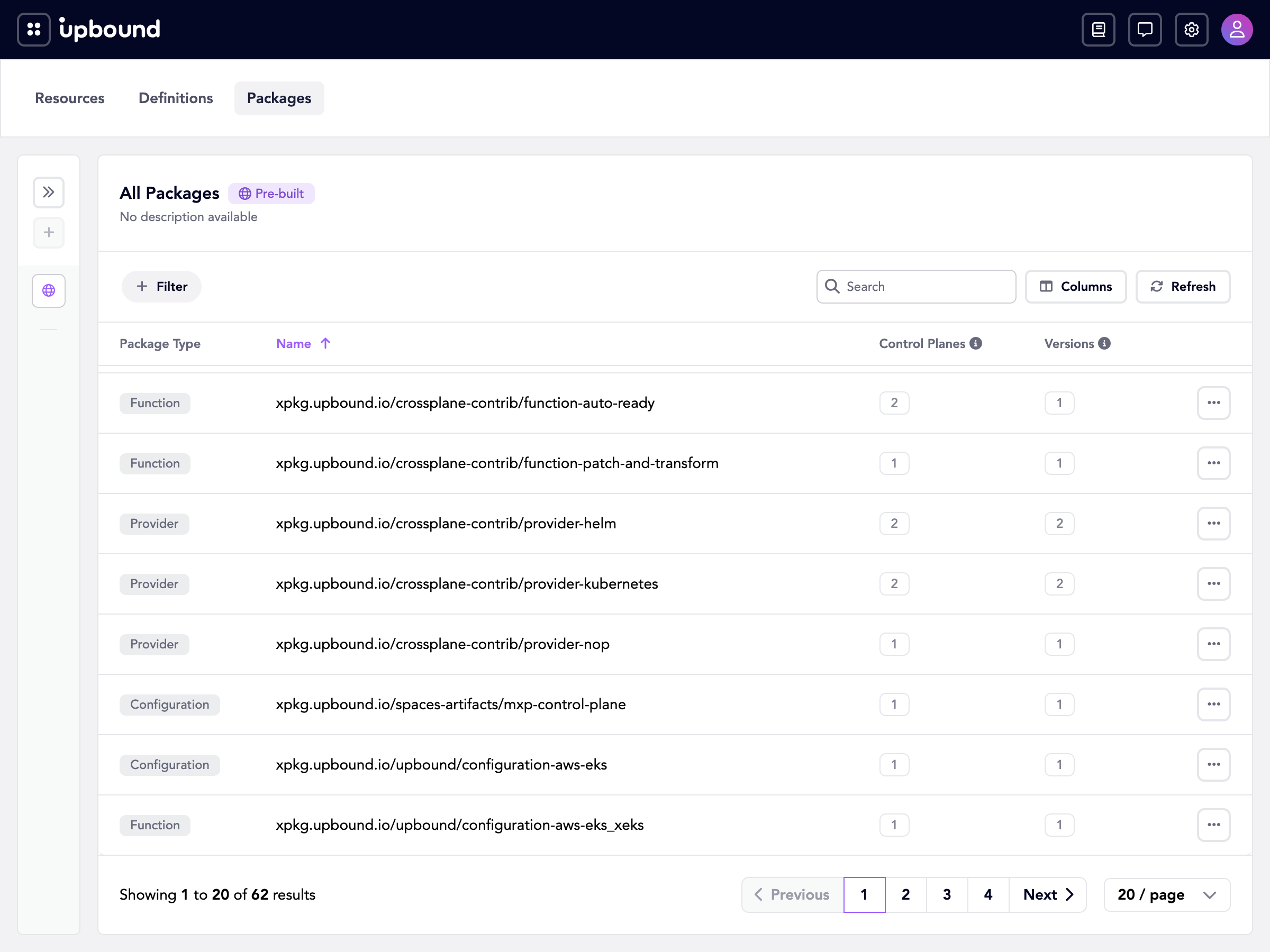
Packages is a fleet-wide list of the Crossplane packages your connected control planes have declared. Hub correlates each package by its OCI repository, so one row covers every control plane that declares it and every version they declare.
The AggregatedTypes gate serves this view and
Definitions. It defaults to on. See Feature
flags to turn it off.
Hub identifies a row by package type and repository, such as the provider
xpkg.upbound.io/upbound/provider-aws. A single row spans control planes and
versions, so you can see the reach of a package across your fleet at a glance.
Packages covers all four package types: providers, configurations, functions, and Upbound AddOns.
Opening the view
Open the navigation menu from the header, then choose Packages under
Insights. The tab strip on the Resources page, the quick access list on the
home page, and the command palette all reach the same view, which lives at
/explore/packages.
Both the menu entry and the tab appear only when the API is available. When the gate is off, Hub hides them and redirects the page to Resources.
The packages list
Each row is one correlated package. The table shows:
- Package Type.
Provider,Configuration,Function, orAddOn. - Name. The OCI repository, without a tag or digest.
- Control Planes. How many control planes declare the package.
- Versions. How many distinct versions the fleet declares.
Search by repository name, and select a column header to sort.
A version is the reference a control plane declares the package at, read from
spec.package on the package object. Hub records the OCI tag, such as
v1.24.0. When a control plane pins the package by digest alone, Hub records
that digest, such as sha256:5f3c…, as the version. A reference carrying both
a tag and a digest counts under its tag.
A version count above one means control planes declare the package under more than one distinct reference. The same image counts twice when one control plane pins it by tag and another pins it by digest.
Packages reflects what a control plane declares, not what installed successfully. A package appears here as soon as its object exists, even when the image never pulled or the revision never became healthy. Open the object from the Source column in the detail drawer to check its install status.
Filtering the list
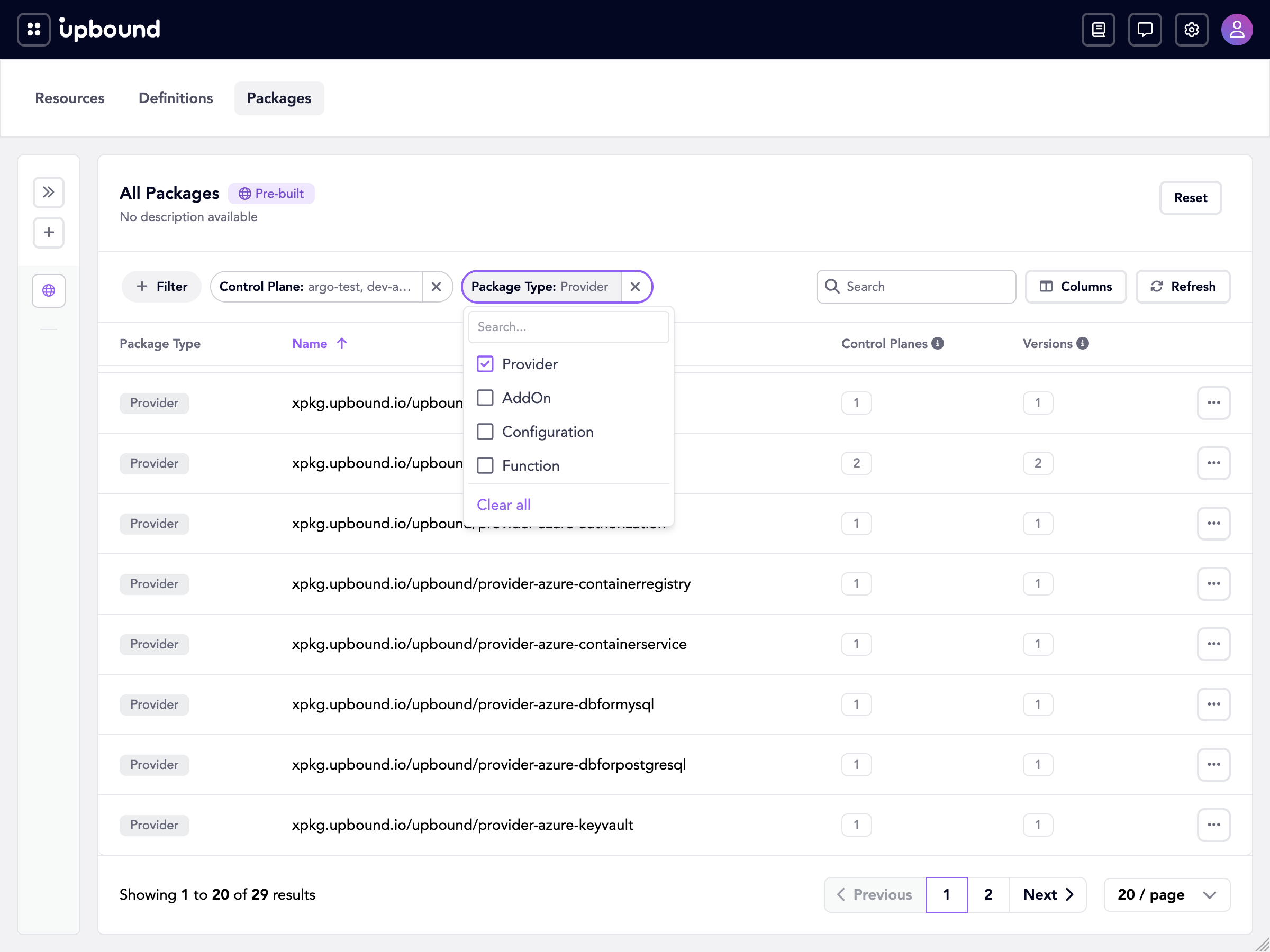
A filter bar sits above the table. Choose Filter to see the filters this table offers, then pick one to add it to the bar:
- Package Type. One or more of Provider, Configuration, Function, and AddOn.
- Control Plane. One or more control planes.
Each filter you add becomes a pill on the bar, labeled with its name and the current selection. Selecting a pill opens its value list, where both filters accept several values at once. Long lists have a search box. Remove one filter with the × on its pill, or clear every filter with Clear All.
Filters combine, so a bar holding both narrows to the packages of those types declared on those control planes. To filter from the table instead, right-click a cell and choose Filter by this value.
Package details
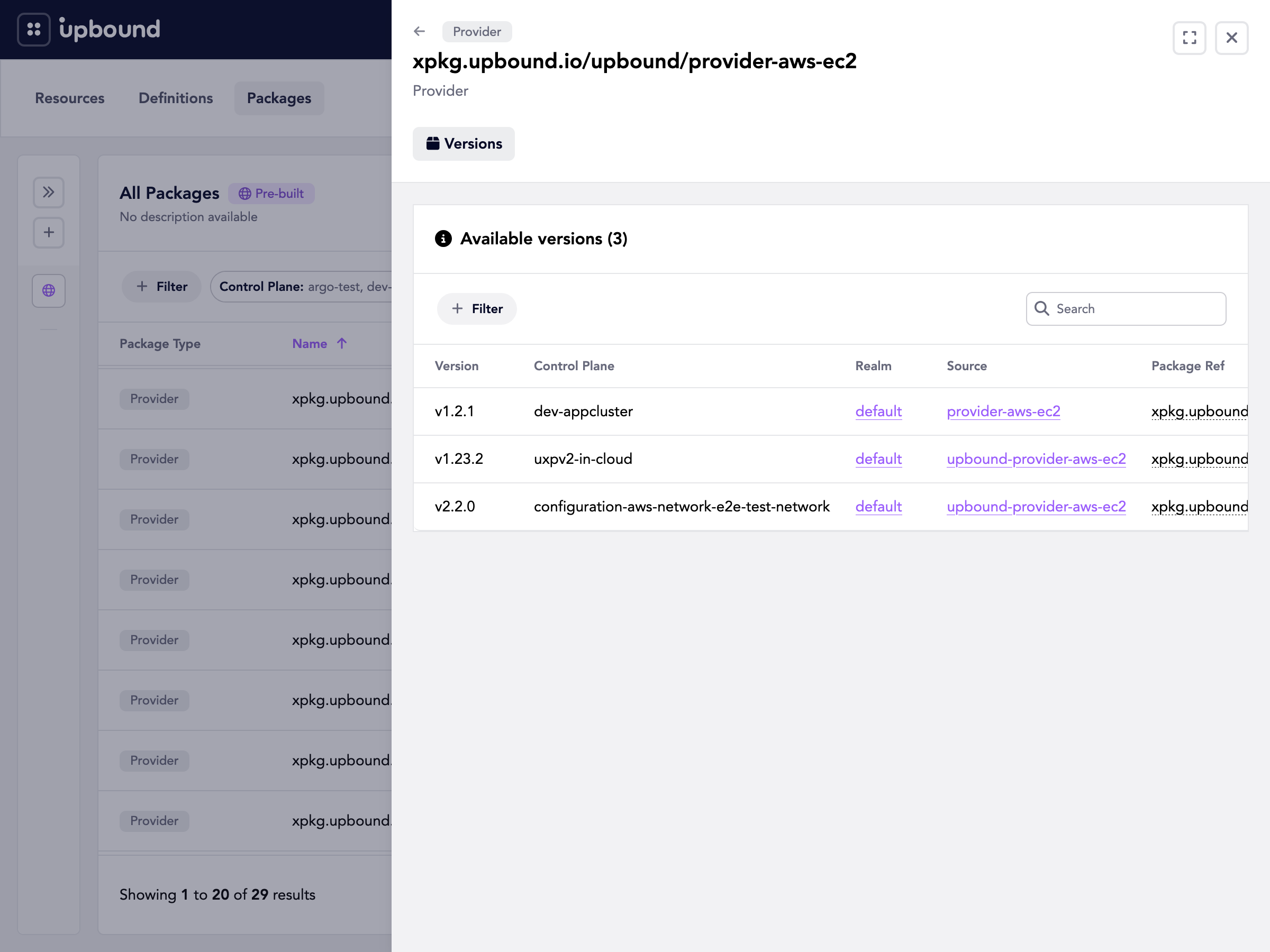
Select a row to open a detail drawer. The heading shows the repository and the package type, and the Versions tab lists one entry for every version and control plane pairing:
- Version. The tag or digest that control plane declares.
- Control Plane. The control plane that declares this version.
- Realm. The realm the control plane belongs to. Selecting it opens the realm.
- Source. The name of the
Provider,Configuration,Function, orAddOnobject on that control plane. Selecting it opens that live resource. - Package Ref. The full package reference as declared, including the tag or digest.
Filter the table by version to see which control planes pin a particular release.
Access and counts
Counts reflect your access. Hub correlates a package across the whole organization, but the control plane count, the version count, and the rows on the Versions tab only include control planes in realms you can reach.
Unless you have access to every control plane in the organization, the counts are partial. A package that looks consistent at one version may sit at another version on control planes you can't view. See Access and authorization.
Common tasks
- Inventory every provider, configuration, function, and AddOn your fleet declares, without listing package objects on each control plane.
- Find version skew by sorting on the version count, then confirm which control planes lag on the Versions tab.
- Track a rollout by watching a package's version count return to one.
- Find which control planes pin a package by digest rather than a tag.
Going further
Packages answers which control planes declare a package, and at which version. It reports on the package objects on your control planes, not on the contents of the package images.
Catalog expands on the same idea by indexing the images themselves. Catalog records the resource types each image declares, serves their OpenAPI schemas, and searches across indexed images and their descriptions, so you can inspect an API without installing the package.
Catalog is a preview feature and, unlike Packages, it's disabled by default. See Feature flags to turn it on.
Enabling Catalog doesn't replace Packages. Catalog appears as an extra destination alongside it.
Querying the API
The Console reads the crossplanepackages resource in the
hub.upbound.io/v1alpha1 API group:
crossplanepackages. Lists and gets correlated packages. Filter a list bypackageTypeandcontrolPlane.- The
distributionsubresource. Per-version detail for one package: each version, and the control planes, realms, source objects, and package references behind it.
See also
Features
Reference